Picking a budgeting app isn’t really about finding the “best” one in some universal sense — it’s about finding the one that matches a method you’ll actually stick with, since the fanciest app in the world doesn’t help if you stop opening it after two weeks. The good news is that most of the best budgeting apps right now map cleanly onto a handful of methods, which makes the choice a lot less overwhelming than the app store makes it look.
Finding the Best Budgeting Apps Starts With the Method, Not the App
Before comparing features, it’s worth knowing which budgeting style actually fits how you think about money. Forbes Advisor’s testing notes point to this directly: an app built for hands-on, “assign every dollar a job” budgeting suits someone very different from an app built for a lighter, more automated overview. If you’ve already read through zero-based budgeting or the envelope system and one of them clicked, that’s actually the more useful starting point than any app comparison chart.
EveryDollar — Zero-Based, Ramsey-Style
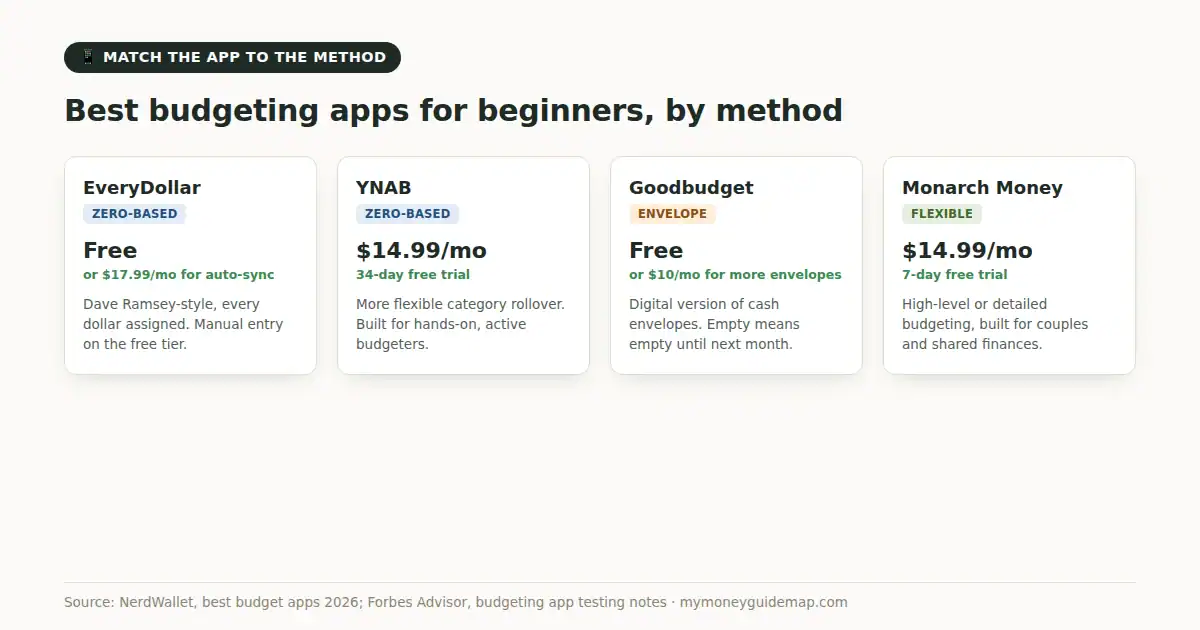
EveryDollar is built directly around the zero-based approach popularized by Dave Ramsey: every dollar of income gets assigned to a category until nothing’s left unaccounted for. NerdWallet notes the free version requires manual transaction entry, while the paid tier ($79.99/year or $17.99/month) adds bank syncing. It’s a solid fit for anyone who already liked the structure of zero-based budgeting and wants an app that enforces that same discipline rather than one that’s more forgiving about it.
YNAB — Zero-Based, More Flexible Rules
YNAB (You Need A Budget) runs on a similar “give every dollar a job” philosophy but with more flexibility in how categories roll over and adjust month to month. It runs $14.99 a month or $109 a year, with a 34-day free trial, and it’s genuinely built for people who want to be actively involved in their budget rather than checking in passively. If EveryDollar’s rigidity doesn’t appeal but the underlying zero-based logic does, YNAB is usually the next app worth trying.
Goodbudget — Digital Envelopes
Goodbudget is essentially the envelope system translated into an app, with virtual envelopes standing in for physical cash. There’s a genuinely usable free version, with a $10-a-month premium tier for more envelopes and device syncing. It keeps the same core mechanism that makes envelope budgeting work — a category that’s empty stays empty until next month — without requiring an actual trip to the bank for cash.
Monarch Money — For Couples and Bigger Pictures
Monarch Money runs $14.99 a month or $99.99 a year and takes a more flexible approach, letting you budget at a high level or drill into detailed category limits depending on how much granularity you want. It’s built with shared finances in mind, which makes it a common pick for couples managing money together, and it includes investment tracking alongside the budgeting side rather than treating them as separate tools.
Free Versus Paid, Honestly
Among the best budgeting apps out there, nearly every one on this list gates its best features behind a subscription, which is worth factoring in before committing — a $100-a-year app is a real ongoing cost, not a one-time purchase. The free tiers of EveryDollar and Goodbudget are genuinely usable starting points if you’re not ready to pay before you know a method sticks; the manual entry they require is more friction, but that friction is also part of what makes budgeting stick for some people, since it forces you to actually look at every transaction rather than let it scroll by in an automated feed.
The Actual Takeaway
The best budgeting apps for beginners aren’t the ones with the most features — they’re the ones built around a method that matches how you already think about spending. If zero-based budgeting felt right, EveryDollar or YNAB are the natural next step; if the idea of a category running dry appealed more, Goodbudget brings that same logic into an app. Start with whichever free tier matches your method, and only pay for more once you’ve actually confirmed you’ll keep using it.
2 thoughts on “Best Budgeting Apps for Beginners”